How to Track Roll-Off Containers: Know Where Every Dumpster Is and What It Is Billing
Most roll-off containers that go missing are not stolen. They are forgotten on finished jobs. Here is how to number, status, age and count your fleet so every container is either earning or back in the yard.
Short Answer
To track roll-off containers reliably, give every container a unique number painted large enough to read from the truck cab, record every drop and pickup against that number at the moment the driver completes it, and review a days-on-site report every week. Those three habits tell you which customer has each container, since when, and whether it should still be there.
Most containers that go missing are not stolen. They are forgotten, left on a job that ended weeks ago, recorded as picked up when the driver actually left it, or moved to a new address the office never heard about. GPS trackers help with theft and recovery, but they cannot tell you who a container is billed to or whether the rental should have ended. Only the work order record does that.
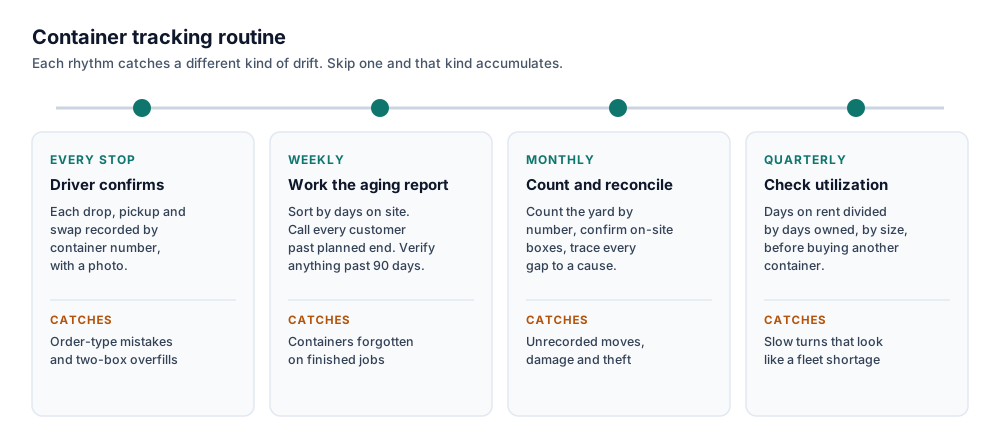
The routine that keeps the count honest runs on four rhythms.
- Drivers confirm every drop, pickup and swap by container number before leaving the site.
- The office reviews the aging report weekly and calls every customer past their planned end date.
- The yard is counted and on-site containers are confirmed monthly, and every discrepancy is traced to a cause.
- Utilization by size is reviewed quarterly, before anyone buys another container.
This guide is for roll-off operators who own the containers. Tracker battery and price figures come from published vendor sources, listed at the end and checked on October 5, 2026.
Why Roll-Off Containers Go Missing
Theft does happen, and in some markets it is a real line item. But the container that costs most operators the most money is the one nobody is looking for, because the system says it is somewhere it is not. There are five common ways that happens.
The forgotten container
The job finishes, the crew leaves, and nobody calls for a pickup. The container sits. If your agreement bills until the container comes back, there is revenue nobody is invoicing. If it does not, the container is simply idle. Either way it is not in the yard, and the next customer who wants that size on Friday gets told you are out.
The overfilled swap
A driver arrives for a swap, sets the empty down, then finds the full container is too heavy to haul legally. The driver leaves with an open bed. The site now has two containers and a system that recorded a completed swap shows one. Our guide to roll-off dispatch terms walks through why swaps are where most count drift starts.
The changed order
A dump and return becomes a final at the last minute, or a final becomes a swap, and the decision is made in the field and never written down. From that moment the container's status is wrong, and so is the rental clock.
The unrecorded relocation
The customer asks for the container to go to their second site across town. The driver moves it. The job record stays with the first address, so the container is physically at one place and billed to another.
Theft and unauthorized moves
Containers do get taken, and customers sometimes move a box themselves with their own equipment. This is the one cause where knowing the physical location between your own visits matters, and it is where GPS trackers earn their cost.
Four of those five causes are record-keeping failures, not security failures. That is good news, because record-keeping is cheaper to fix.
What a Forgotten Container Actually Costs
A container left on a finished job costs you in two ways, the extra days you could have billed and the rentals it could have taken instead.
Here is a worked example. The rates are assumptions for illustration, so replace them with your own.
Suppose a 20-yard container sits 21 days on a job that ended, and your agreement allows extra-day charges at $10 a day. If nobody notices, that is 21 times $10, or $210 in charges never invoiced.
Now the second cost. Suppose your average rental cycle, from drop through the dump and back to available, runs 10 days. Those 21 idle days are 2.1 rental cycles, so that one container could have taken two more rentals, each with its own haul charge and disposal margin.
At fleet scale it compounds. If four containers a month go through the same thing, that is 4 times $210, or $840 a month and $10,080 a year in extra-day charges alone, before counting the rentals you turned away. And the expensive version of this mistake is the operator who cannot see idle containers, concludes the fleet is too small, and buys more. A new container is a capital purchase. Finding the ones you already own is free.
Step 1: Give Every Container a Number You Can Read From the Cab
Everything else depends on this. A fleet of identical 20-yard containers with no way to tell them apart can be counted, but it cannot be traced, and you cannot prove which box went to which job.
Paint or stencil a unique number on both long sides and on the door end, large and high-contrast, so a driver can read it from the cab and a photo captures it without zooming. Paint gets scraped by debris and by the truck, so back it up with a welded or riveted metal plate carrying the same number. If you use QR labels, mount them somewhere protected and replace them when they wear.
A number that encodes the size helps drivers and dispatchers. A scheme like 20-014 or 30-006 tells you the size and the specific box in one glance. Never reuse a retired number, because the old container's history goes with it.
For each container, keep a record of the number, the size, the purchase date, its current condition and its current status. That is the whole asset register. It does not need to be more complicated to work.
Step 2: Use a Status That Only Changes When the Driver Confirms It
Every container should be in exactly one status at any time, and the status should only change when someone confirms something actually happened.
| Status | What it means | What moves it in | What moves it out |
|---|---|---|---|
| Available | In the yard, rentable | Emptied and returned, or repaired | A drop is scheduled for it |
| Reserved | Committed to a scheduled drop | Drop scheduled | Drop completed, or job canceled |
| On site | Placed at a customer job, rental running | Driver confirms the drop | Driver confirms the pickup |
| In transit | On the truck, headed to the scale or yard | Driver confirms the pickup | Dumped and returned, or set on the next job |
| Out of service | Damaged, in repair or retired | Inspection finds damage | Repair completed |
The rule that makes this work is that a scheduled job is not a completed job. The dispatch board shows what you intend to happen. The inventory has to show what drivers confirmed did happen, by container number, with a photo. When the driver on that overfilled swap records a drop and no pickup, the job correctly shows two containers, and the second one gets billed instead of forgotten.
Step 3: Pick a Tracking Method That Matches Your Fleet
There are six common ways operators track containers. They answer different questions, and the most important difference is between knowing where a container physically is and knowing who it is billed to and since when.
| Method | What it tells you | What it misses | Cost to run |
|---|---|---|---|
| Whiteboard or spreadsheet | Whatever someone wrote down | Anything not written down, and any history | Free, plus office time |
| Count by size per job | How many of each size are at each job | Which specific container, so no damage or rental history | Software subscription |
| Serial number on confirmed work orders | Which container is at which job, since which date | Moves nobody reported | Software, plus paint and plates |
| QR scan at drop and pickup | The same, with fewer typos, and proof the driver was at that container | Location between scan events | Labels, plus software that reads them |
| RFID tags with truck readers | Automatic identification when a container is loaded or set down | Location between events, and it needs a reader on every truck | Reader hardware per truck, plus tags |
| GPS tracker on each container | Physical location between visits, and movement alerts | Who it is billed to, and whether the rental should have ended | Hardware per container, plus a monthly data plan |
On cost, published tracker buying guides put GPS hardware at roughly $80 to $250 per device, with solar models at the upper end, and most plans add a monthly cellular data fee. Battery life depends heavily on how often the device reports. One tracker manufacturer's spec sheet quotes up to seven years on a single battery at one or two location reports a day, and warns that second-by-second reporting shortens that drastically. For containers that sit still for days, a daily report is usually plenty.
The practical answer for most operators is to treat serial numbers on driver-confirmed work orders as the foundation and GPS as an optional layer on top. The work order record is what bills the customer, starts and stops the rental, and survives a dispute. GPS adds value where theft or customer-moved containers are a real problem, or on high-value specialty containers. It does not replace the record, because a dot on a map cannot tell you whether that customer still wants the box.
For a broader look at tracking technology across rental equipment, including photo verification and digital delivery logs, see our guide to how rental companies track inventory. It was written for fence panels, but the method comparison applies to any equipment you deploy and retrieve.
Step 4: Review the Aging Report Every Week
The aging report is the single most useful view in a roll-off business. It lists every container on site, sorted by how long it has been there, next to the date the rental was supposed to end.
Here is what one looks like on October 5, with illustrative jobs.
| Container | Size | Job | Dropped | Days on site | Planned end | Action |
|---|---|---|---|---|---|---|
| 20-022 | 20 yard | Oak Ave roof | Jul 1 | 96 | Jul 15 | Escalate and verify it is there |
| 30-011 | 30 yard | Pine St addition | Aug 18 | 48 | Sep 1 | Call the customer |
| 20-014 | 20 yard | Maple St remodel | Sep 2 | 33 | Sep 16 | Call the customer |
| 30-006 | 30 yard | Elm St duplex | Sep 28 | 7 | Oct 12 | None |
Work it in three buckets. Containers inside their planned period need nothing. Containers past their planned end need a call this week, to confirm whether the customer is still using them, to schedule the final if they are done, and to confirm the extra days are being billed if they are not. Containers past 90 days need escalation and a physical check, because a container that old on a job is either a long project nobody updated or a container that is no longer where the record says it is.
The call is the part operators skip. It is also the part that turns idle days into either an invoice line or an available container, and most customers appreciate being reminded before the bill grows.
Step 5: Count the Yard and Reconcile Every Month
Records drift even with good habits. A monthly count catches the drift while it is still small enough to trace.
- Pick a quiet time, usually early morning or the last afternoon of the month, and pause yard moves while you count.
- Walk the yard and list every container by number, including any marked out of service.
- Compare that list against everything the system shows as available, reserved but not yet dropped, or out of service.
- For containers on site, have drivers already passing those jobs confirm the number with a photo, rather than sending a dedicated truck.
- Compare each job's confirmed containers against what the system says that job has.
- Trace every discrepancy to its cause, whether that is an unrecorded pickup, an unrecorded drop, a relocation, damage or theft, and then fix both the record and the step in the process that let it happen.
- Record the count date and the number of discrepancies found.
That last number is the one to watch. A healthy operation sees it fall toward zero over a few months. If it holds steady, the leak is in a specific step, usually swaps or relocations, and the count is telling you which one.
Step 6: Let Utilization Decide When You Buy More Containers
Utilization is days on rent divided by days owned, measured by container size over a period. If you own twelve 20-yard containers, a 30-day month gives you 360 container-days. If 270 of them were on rent, utilization for that size was 75 percent.
There is no universal target, because it depends on your market, your mix of short and long jobs and how fast you turn containers. What matters is the trend and the gap between sizes. If you are short on 20-yard containers every Friday but their utilization is middling, the problem is turn time, meaning finals that sit on the board for days, not fleet size. Fix the turns first and the shortage often disappears. If utilization for a size is consistently high and you are still turning work away, that is the evidence for buying more.
Utilization only works if the numbers under it are honest, which is why it comes last. A fleet full of phantom containers will look underused on paper while the yard is empty.
How SiteRento Tracks Roll-Off Containers
This is our own product, so read this section as our description. SiteRento's dumpster rental software is built around the routine above, with the record kept by the work itself rather than by someone updating a list after the fact.
The count follows what drivers complete
Inventory changes when a driver completes a drop or pickup in the crew app, not when dispatch schedules one. Completing a drop records what went on site, and completing a pickup records what came back. Drivers add photos and can be required to collect a signature before the job can be completed. The app runs in the phone's browser with nothing to install, and photos taken without signal upload when the phone reconnects.
Billing starts on the drop day and runs until the container comes back
Approving a completed drop starts the rental from the day the container was dropped, not the day someone got to the paperwork. The rental keeps billing every period until the pickup is completed, so a job that runs long bills its extra days like any others. Overrun alerts tell your team in the app and by email when a job passes its planned end, which is the weekly aging call prompted automatically. Every movement carries its own service date, and if a work order's date is corrected, its inventory and draft invoices move with it.
Every job and every yard, counted by size
Each job shows the containers on site by size and how many days they have been out, with anything past 90 days flagged. Each yard shows what is available and what is reserved for scheduled drops. Each job also tracks what was lost or damaged, so a container that does not come back is recorded against the job that had it. When deployed equipment cannot be traced back to a yard, an unassigned equipment review helps you settle it, with a history you can undo.
Reservations and a 90-day availability forecast
Scheduling a drop reserves the container it needs, and canceling the job releases it. The inventory forecast projects stock at 30, 60 and 90 days and flags sizes that will fall below their reorder point, so a Friday shortage shows up before Friday.
Reports on utilization, idle containers and shrinkage
The inventory availability report shows utilization and its trend, idle equipment, and shrinkage from lost and damaged items, filtered by yard. That is the quarterly buy-or-wait decision with the numbers already assembled.
Individual containers by number, in beta
With Asset Management turned on, each container gets a QR label, its own location history and a record of every rental, with every drop and pickup logged against the container along with the job and date. It also tracks maintenance work orders with parts and labor, and the rental revenue each container has earned. Asset tracking is in beta and is switched on in account settings.
One system if you run more than roll-offs
Plenty of roll-off operators also run temporary fence or portable restrooms, and those lines share customers and job sites. SiteRento runs temporary fence, portable restroom and roll-off rentals in one platform, priced by the number of service types you manage with unlimited users, so adding drivers does not add seat charges. Pricing is quoted on request, and the pricing page explains how it is built.
What SiteRento does not do
SiteRento does not supply GPS hardware for containers. Container location comes from what drivers confirm at each drop and pickup, or from QR scans with Asset Management on. If theft or customer-moved containers are a real problem in your market, a dedicated tracker adds the between-visit location layer described above. Accounting sync is with QuickBooks Online only; QuickBooks Desktop is not supported.
Switching with containers already out
You do not have to wait for every rental to close. The project import brings in each job with the containers already on site and a billing anchor date, so periods already billed are not billed again. If some periods were never invoiced, Catch Up Billing drafts one invoice per missed cycle for review. The details are on our switching page.
Frequently Asked Questions
How do dumpster rental companies track their roll-off containers?
Most track containers by giving each one a unique number and recording every drop and pickup against that number on a work order, so the record shows which job has each container and since when. Operators then review a days-on-site report weekly and count the yard monthly to catch drift. Some add QR labels, RFID tags or GPS trackers, but the driver-confirmed work order record is the foundation, because it is what starts and stops billing.
Do roll-off containers need GPS trackers?
Not usually. A GPS tracker tells you where a container physically is between visits, which matters most where theft or customer-moved containers are common, or for high-value specialty containers. It cannot tell you who the container is billed to or whether the rental should have ended. For most operators, serial numbers on driver-confirmed work orders do more to stop lost revenue, and GPS is an optional layer on top.
How long do dumpster GPS tracker batteries last?
It depends on how often the tracker reports its location. One manufacturer's spec sheet quotes up to seven years on a single battery at one or two location reports per day, and much shorter life at second-by-second reporting. Solar-powered models trade a higher upfront price for less battery maintenance. For roll-off containers that sit in one place for days, a daily location report is usually enough.
What is a phantom container?
A phantom container is one the system shows in the wrong place, usually listed as available or picked up while it is physically sitting on a job. The most common causes are a swap where the driver could not haul an overfilled container and left two on site, an order type changed in the field without updating the record, and a relocation the job record did not follow. Phantom containers go unbilled and make a fleet look larger than it is.
How should roll-off containers be numbered?
Give each container a unique number that is never reused, paint or stencil it large on both long sides and the door end so a driver can read it from the cab, and back it up with a welded or riveted metal plate in case the paint is scraped off. Many operators build the size into the number, such as 20-014 for a 20-yard container, so drivers and dispatchers can read the size and the specific container at a glance.
How often should a roll-off operator count containers?
Count the yard and confirm the containers on each job site at least monthly, and trace every discrepancy to its cause. Between counts, review a days-on-site report weekly and call customers whose containers are past their planned end date. Drivers should confirm every drop and pickup by container number at the stop itself, which keeps the monthly count short.
What is a container aging report?
A container aging report lists every container on a customer site, sorted by how many days it has been there, alongside the planned end date of the rental. It shows which containers are inside their rental period, which are past their planned end and need a call to the customer, and which have been out so long, such as more than 90 days, that someone should confirm they are still there.
Can you track roll-off containers without serial numbers?
Yes, up to a point. Counting containers by size at each job tells you how many of each size are out and where. But without a unique number on each container you cannot trace damage or rental history to a specific box, prove which container went to which job in a dispute, or reliably find a container the record has lost. Most operators adopt serial numbers once they run more than a handful of identical containers.
The Bottom Line
Roll-off containers rarely disappear. They get forgotten, recorded in the wrong place, or moved without anyone telling the office. That makes container tracking mostly a record-keeping discipline, and the discipline is simple to state. Number every container so it can be read from the cab. Change its status only when a driver confirms the work. Work the aging report every week, count the yard every month, and look at utilization before buying more.
GPS trackers are a useful layer where theft is real, but the record that bills the customer is the one that matters most. Get that right and the containers that were idle on finished jobs start showing up as invoice lines, or as available boxes in the yard on Friday morning.
See every container on every job
Watch a driver complete a drop with a photo, a rental bill until pickup, and the aging view flag a container past its planned end.
Sources
All sources opened on October 5, 2026. Vendor sources are named but not linked.
- Skeyewatch, Suntech 4290L GPS Asset Tracker product page (battery life of up to seven years at one or two location reports per day, reduced at constant refresh rates)
- Upper, Dumpster GPS Tracking: A Guide for Waste Haulers (solar-powered tracker hardware pricing)
- AirPinpoint, Dumpster GPS Tracking: Roll-Off Container Tracking for Waste and Recycling (hardware and monthly data plan pricing by tracker model)
- Wireless Links, Waste and Recycling Fleet and Asset Tracking (RFID container tags with truck-mounted readers)