Temporary Fencing Software
Temporary fence rental software that stops panel loss
SiteRento is temporary fence rental software: it counts the panels on every job site from the work your crews complete, bills each rental on its 28-day cycle, and syncs invoices to QuickBooks Online.
- Guided setup
- Expert support
- QuickBooks Online sync

The hidden cost of poor panel tracking
Shrinkage gets written off as the "cost of doing business," but it adds up. On a 10,000 LF fleet, losing 5% in a year means buying back about 50 panels, roughly $6,000 at $120 a panel, before the rent those panels would have earned and the time lost to "short-ship" disputes.
SiteRento doesn't just track your steel. Every delivery and pickup is recorded with photos and a signature, the proof you need in a dispute, and each site's count is kept by the work your crews complete.
Spreadsheet chaos
Panel counts in one file, billing in another, customer info somewhere else. You're copying data between systems, making manual updates, and praying nothing falls through the cracks. One typo means a panel disappears from your records—but not from the job site.
Blind spots
"How many panels are at the Johnson site? When does their rental end?" If answering these questions requires digging through emails, texts, and handwritten notes, you're flying blind. Without real-time visibility, you can't make confident decisions about inventory or new jobs.
Billing leakage
Jobs run long, panels stay out an extra week, but invoices don't reflect reality. Manual billing means you're leaving money on the table every month. The 28-day billing cycle that's standard in this industry becomes a nightmare to track by hand.
Collection battles
The project's done, but the customer has no urgency to pay pickup fees or that final invoice. Without automated billing and clear documentation, you're stuck chasing payments instead of growing your business.
Temporary fence rental, quote to pickup
One rental in four steps, with a record of every panel from the quote to the truck that brings it back.
Quote the job
Price panels, gates and delivery from your own templates and rate cards, then turn the accepted quote into a job without retyping it.
Install it, with proof
The crew opens the work order on a phone, records the panels installed and adds photos and a signature. The job site’s count goes up.
Bill every 28 days
Invoices are drafted on each 28-day cycle, prorated when a rental starts or ends mid-cycle, and wait for your review before they go out.
Pick up and close
The pickup work order takes the panels off the job site’s count and back into the yard, so the next quote knows what is available.
Temporary fence priced the way it's sold: by the linear foot
Fence is quoted, billed and moved by the foot. SiteRento keeps the footage next to the panel count on every job.
Measure the fence line
Trace the fence line on the site plan and get the total linear feet for the quote, instead of measuring off a printout with a scale ruler.
Bill per foot or per panel
Each panel item knows how many linear feet it covers, so a job site shows panels and footage, and its rental can bill per linear foot or per unit.
Charge for the moves
When the GC needs the fence line moved, relocate-and-reset and remobilization work orders are priced per linear foot, so the crew’s time gets billed.
Temporary fencing software features, panel to invoice
SiteRento isn't generic rental software with fencing bolted on as an afterthought. It's purpose-built for temporary fence rental operations—designed by people who understand 28-day billing cycles, panel loss headaches, and the chaos of managing inventory across dozens of job sites.
Panel tracking by job site
Know where every panel is. SiteRento's inventory tracking shows you what's in your yard, what's deployed at each job site, and what's reserved for scheduled work. When crews complete an install or pickup, the counts update.
- Quantities recorded on every job, or QR labels on serialized units with Asset Management (beta)
- Photo documentation of damage before it becomes a dispute
- Low-stock badges and a 30/60/90-day forecast so you're not caught short on a busy weekend


Automated 28-day billing cycles
Stop calculating billing periods by hand. SiteRento automatically tracks rental start dates, generates invoices on your 28-day cycle, and handles pro-rated calculations when jobs start or end mid-period.
- Recurring invoices drafted on schedule, ready to review and send
- Automatic adjustments when rentals extend or end early
- Pro-rated calculations for mid-period starts and stops
Instant quote generation
Turn quote requests into professional proposals in minutes, not hours. Enter the linear footage, select your panel type and accessories, and SiteRento calculates everything—including delivery, installation, and your standard rental terms.
- Email quotes directly to customers with your branding
- One-click conversion from quote to job—no re-entering data
- Zero transcription errors with automated calculations

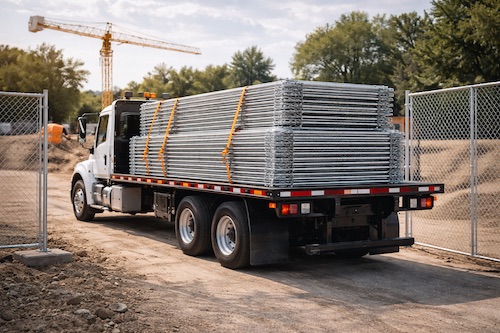
Delivery & pickup scheduling
See your entire delivery and pickup schedule at a glance. Drag-and-drop scheduling makes it easy to plan each crew's day, reassign jobs when plans change, and ensure nothing falls through the cracks.
- Mobile assignments with site address, contact info, and panel counts
- Real-time completion tracking when drivers mark jobs done
- Special instructions automatically included in driver assignments
See how SiteRento can transform your operations
Stop losing panels and revenue. Get a personalized demo and see exactly how SiteRento handles your specific workflow.
Site-level inventory control
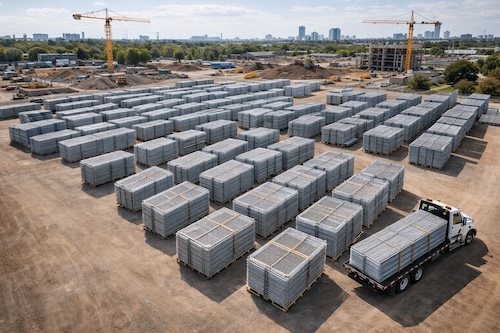
Track panels at every location—not just totals, but exactly which panels are where. When a GC calls asking if you can add 20 panels to their site, you'll know immediately whether you have availability and where those panels are coming from.
- Utilization dashboards show which panels are earning money vs. sitting idle
- Shrinkage reports show where panels go missing
- Revenue and invoice-aging reports next to utilization, before you buy more panels

Mobile field operations
Your crews work in the field, not at a desk. SiteRento's mobile app gives them everything they need to document deliveries, capture signatures, and update job status from their phones.
- Photo documentation of panel condition at delivery and pickup
- Electronic signatures to confirm receipt and completion
- Location history shows where and when each serialized unit was installed or picked up (Asset Management, beta)
Customer portal & online payments
Give your customers the self-service experience they expect. They can view quotes and invoices and pay online—without calling your office.
- Card and ACH payments through QuickBooks Payments, or through Stripe (early access)
- Autopay on recurring rentals through QuickBooks Payments
- Self-service portal reduces administrative overhead

Fence rental software that syncs with QuickBooks Online
SiteRento works with your existing accounting and payment systems—no double entry, no manual exports, no reconciliation headaches.


QuickBooks Online integration
QuickBooks Online sync keeps your books accurate without duplicate data entry. Invoices created in SiteRento are pushed to QuickBooks. Invoices paid in QuickBooks show as paid in SiteRento. Customers are pushed to QuickBooks when you create or edit them. QuickBooks Payments adds card and ACH payment options and autopay for recurring rentals.
Stripe payment processing
Accept card and ACH payments in the customer portal with industry-leading security. Stripe's PCI-compliant processing protects your customers' payment data. Stripe payments are in early access: the SiteRento team switches them on for your account.
Temporary fence rental for construction, events and homebuilders
Construction site fencing
Long-term rentals, multiple sites, demanding GCs. SiteRento helps you manage perimeter security across dozens of active projects. Track panels by site, automate monthly billing, and maintain the documentation contractors require. When the project timeline shifts—and it always does—your billing and inventory adjust automatically.
Events & festivals
Short turnarounds, custom configurations, weekend installations. Event fencing requires precision scheduling and fast quotes. SiteRento's drag-and-drop calendar and instant quoting help you book more events without the operational chaos. Document setup with photos and get sign-off before you leave the site.
Residential construction
Homebuilders want reliable partners and predictable billing. SiteRento helps you manage relationships across subdivisions and developments with consistent service. Automated billing on 28-day cycles means you get paid on schedule while builders get the clear invoicing their accounting departments require.
Everything SiteRento does for temporary fence rental
One system for the whole job: win the work, run it in the field, track the equipment and get paid.
Price from your own templates and rate cards, then turn won quotes into jobs.
28-day, monthly or custom cycles with proration. Due invoices are drafted for you.
What’s on each job site, what’s reserved and what’s available.
Drag-and-drop crew schedule. Recurring service visits schedule themselves.
Work orders, photos, signatures and quantities from any phone browser.
Invoices, customers and job sites sync to QuickBooks Online.
Plan takeoff
BetaTake measurements straight from a site-plan PDF.
Bid management
Early accessSend one scope to several GCs and track every bid to award.
Customer portal
BetaCustomers accept quotes and pay invoices online by card or ACH.
Beta features are switched on in your account settings. Early access features are switched on by the SiteRento team. See every feature
Switching from spreadsheets or another system?
Bring your active rentals over mid-cycle, without billing anything twice. Import your jobs with the panels already on site and each job's billing date, and billing picks up with the next period.
Also managing other site services?
Many site services operators run more than one equipment type. SiteRento handles them all in one platform.
Guides for temporary fence rental companies
- Business Operations
Practical AI for site services rental companies
How fence, dumpster and portable restroom rental companies can use AI for quotes, customer emails, crew instructions and office work, and what to check.
- Operations & Contracts
How to Write a Temporary Fence Rental Agreement: A Clause-by-Clause Breakdown
What every temporary fence rental agreement needs, clause by clause. Term, 28-day billing, risk of loss, indemnity limits, insurance, and lost panel charges.
- Software & Buying
Best Temporary Fence Rental Software in 2026: How to Compare Your Options
A buyer's guide to the best temporary fence rental software in 2026. Compare fence-specific tools, site-service platforms, generalist rental apps, and ERPs on features, fit, and price.
- Finance & Billing
How Much to Charge for Temporary Fence Rental: 2026 Pricing Guide
What temporary fence rental costs in 2026, per panel and per linear foot, how install and removal fees work, and how operators set rates that protect margin.
- Compliance
Temporary Fence Rental Compliance by State
How temporary fencing compliance varies across U.S. states, what OSHA actually requires, common construction-fence practices, permits, and the stricter rules in cities like NYC and Chicago.
- Inventory Control
The Hidden Costs of Panel Loss (And How to Protect Your Margins)
If you're running a temporary fence rental operation, you're losing panels. Most operators treat panel loss as an unavoidable cost, but it's eating 20-30% of your profit margin.
Frequently asked questions about fence rental software
What does temporary fence rental software do?
How does SiteRento track fence panels across multiple job sites?
What happens when panels are added or picked up partway through a rental?
How does 28-day billing work in SiteRento?
Does SiteRento integrate with QuickBooks?
How does SiteRento help reduce panel loss?
Can my drivers use SiteRento in the field?
What payment methods does SiteRento support?
Can SiteRento handle both construction and event fence rentals?
How long does implementation take?
Ready to stop losing panels?
Track every panel, automate 28-day billing, and stop rental revenue from slipping through spreadsheets. See how SiteRento handles your workflow in a personalized demo.